BLOG
KO
[React] Contributing to React Official Documentation
- 🥶 How do you even do that..
- 💡 Contributing to Open Source
- 🌟 Contributing Again
- 🛠️ Error Debugging
- 🛠️ Error Fix
💡 If you want to see traces of my React studies using Obsidian, check here!
I'm studying React day and night to build my React fundamentals by reading through the React official documentation. While diligently going back and forth between the original and Korean translation, I discovered typos and minor errors, so I decided to contribute to the React documentation while studying.
🥶 How do you even do that..
When looking at job postings, you often see companies looking for developers with experience contributing to open source.
How.. do you even do that..❓
Actually, I also thought I should do it in my head but had no idea how to start. Where should I contribute..? The content would definitely be very difficult, but would I be able to understand it..? Even if I understand it, how should I modify and contribute..?
But seeing is believing. I decided to contribute to projects I use frequently or am studying.
So, I looked through the React official documentation and happened to find that Korean translation was in progress, so I took this opportunity to contribute to open source for the first time.
💡 Contributing to Open Source
The contribution process is not as difficult as you might think.
- Most projects have established ways to contribute (ex: React Korean Documentation).
- Fork the repository and create a branch for modifications.
- Make modifications and push to your repository.
- Create a PR to the original repository.
- Get reviewed by reviewers and once merged, you're done! 🎉
Reading through Korean translation issues, I found several documents that hadn't been translated yet, and I picked an issue with sufficient content and volume to proceed with translation.
My first open source contribution: Translate: Versioning Policy
🌟 Contributing Again
This is what prompted me to write this post.
After my first contribution, while studying using the official documentation, I discovered several typos and created a new PR to fix them.
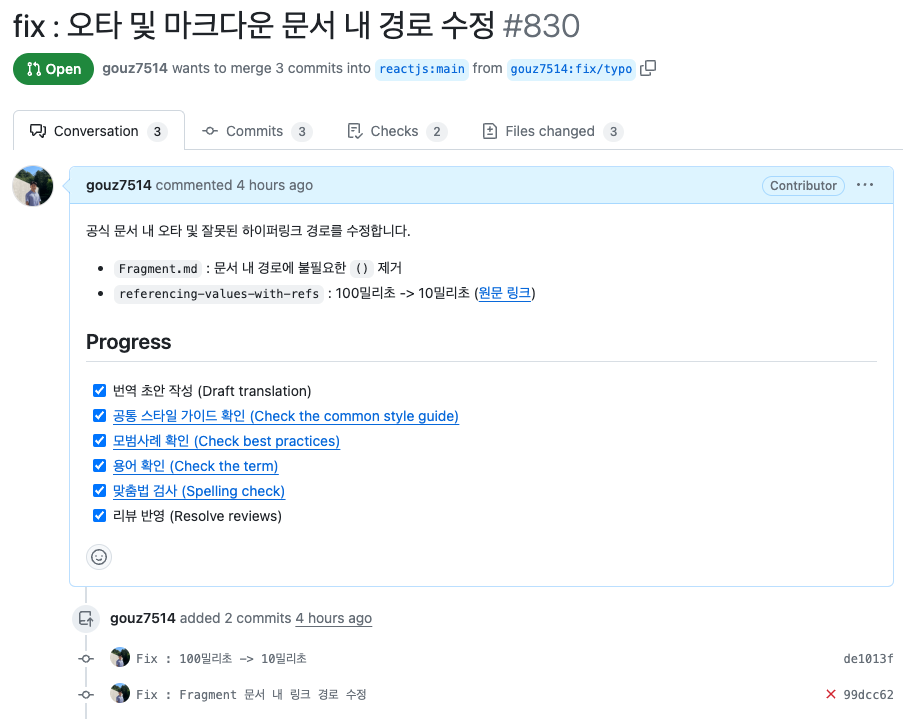
Just as I was about to go to sleep feeling proud, I noticed an error occurring in the github action. Debugging the error, I found that a specific file was causing errors. I could have been satisfied with just fixing the typos, but an error in the action meant something wasn't normal, and this could lead to critical errors later, so I decided to debug and fix this directly.
🛠️ Error Debugging
The action where the error occurred was as follows:
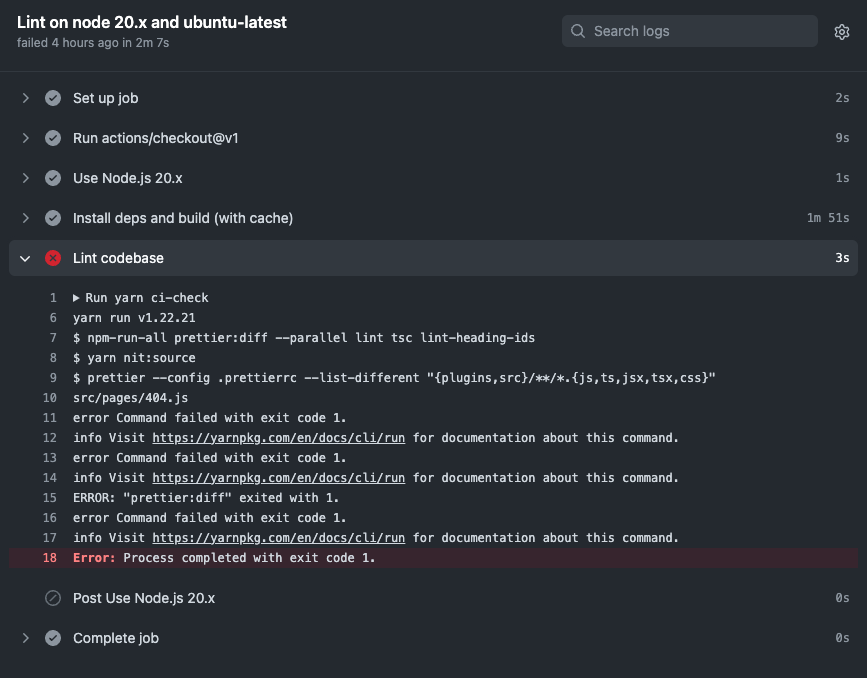
Looking at the action log above:
node 20.xenvironment- Running
ci-checkscript - Running
prettiercommand - Error occurring in
src/pages/404.js
So I decided to fix the 404.js file beyond just fixing typos.
🛠️ Error Fix
The 404.js file where the error was occurring was as follows:
React Documentation Korean Translation - 404.js
/*
 * Copyright (c) Facebook, Inc. and its affiliates.
 */

import {Page} from 'components/Layout/Page';
import {MDXComponents} from 'components/MDX/MDXComponents';
import sidebarLearn from '../sidebarLearn.json';

const {Intro, MaxWidth, p: P, a: A} = MDXComponents;

export default function NotFound() {
  return (
    <Page toc={[]} meta={{title: '페이지를 찾을 수 없습니다'}} routeTree={sidebarLearn}>
      <MaxWidth>
        <Intro>
          <P>요청하신 페이지가 존재하지 않습니다.</P>
          <P>
            저희 잘못으로 인한 오류라면{', '}
            수정할 수 있도록{' '}
            <A href="https://github.com/reactjs/react.dev/issues/new">
            저희에게 알려주세요
            </A>
            {'. '}

          </P>
        </Intro>
      </MaxWidth>
    </Page>
  );
}
At first, I couldn't figure out why the error was occurring. The 500.js file in the same directory was fine, so why was only this one causing trouble..
Then I became curious about what the original 404.js from react.dev looked like and searched for it.
Original - 404.js
/*
 * Copyright (c) Facebook, Inc. and its affiliates.
 */

import {Page} from 'components/Layout/Page';
import {MDXComponents} from 'components/MDX/MDXComponents';
import sidebarLearn from '../sidebarLearn.json';

const {Intro, MaxWidth, p: P, a: A} = MDXComponents;

export default function NotFound() {
  return (
    <Page toc={[]} meta={{title: 'Not Found'}} routeTree={sidebarLearn}>
      <MaxWidth>
        <Intro>
          <P>This page doesn't exist.</P>
          <P>
            If this is a mistake{', '}
            <A href="https://github.com/reactjs/react.dev/issues/new">
              let us know
            </A>
            {', '}
            and we will try to fix it!
          </P>
        </Intro>
      </MaxWidth>
    </Page>
  );
}
The differences I could spot visually were:
- Presence or absence of spaces between
AandPtags - Indentation of the
저희에게 알려주세요part
So I fixed these parts, but the error still occurred, and I eventually analyzed the problematic scripts.
// package.json
{
	"scripts": {
    	...
        "nit:source": "prettier --config .prettierrc --list-different \"{plugins,src}/**/*.{js,ts,jsx,tsx,css}\"",
        "prettier:diff": "yarn nit:source",
        "ci-check": "npm-run-all prettier:diff --parallel lint tsc lint-heading-ids",
    }
}
Each command is executed in the following order:
ci-check -> prettier:diff -> nit:sourceLooking at the error log again, prettier configuration is applied through the .prettierrc file, and an error occurs during this process.
Then it's time to look at the .prettierrc file!
{
  "bracketSpacing": false,
  "singleQuote": true,
  "bracketSameLine": true,
  "trailingComma": "es5",
  "printWidth": 80,
  "overrides": [
    {
      "files": "*.css",
      "options": {
        "parser": "css"
      }
    },
    {
      "files": "*.md",
      "options": {
        "parser": "mdx"
      }
    }
  ]
}
This configuration was applied exactly the same in both the Korean translation and the original, so it wasn't a configuration error.
Looking at the code again, I noticed that printWidth, which means the code length limit, was set quite low at 80, and I thought "Could it be because the code is too long?"
So I modified this part as follows:
// AS_IS
export default function NotFound() {
	return (
      <Page toc={[]} meta={{title: '페이지를 찾을 수 없습니다'}} routeTree={sidebarLearn}>
	      ...
      </Page>
    )
}

// TO_BE
export default function NotFound() {
	return (
      <Page
        toc={[]}
        meta={{title: '페이지를 찾을 수 없습니다'}}
        routeTree={sidebarLearn}>
	      ...
      </Page>
    )
}
And the error was magically fixed! I summarized these modifications and added them to the existing PR, and now I just need to get a review from the reviewer to successfully complete the contribution.
Open source contribution that I was intimidated by turned out not to be that difficult after all. Going beyond simple translation to carefully examining open source and fixing errors, I learned the following:
- Just reading open source documentation helps you become an excellent developer.
- Reading open source code lets you know how excellent developers work.
- My contributions can be of great help to others.
I look forward to continuing my studies so that someday I can contribute directly to code!