BLOG
KO
[NextJS] Switching Styling Tools
- Why Switch Styling Tools?
- Reason 1: use-client
- Reason 2: Complex Setup
- emotion vs styled-components
- Switching to emotion
- Applying Global Styles
The project that went on for over 4 months is finished, and the intense one-month Woowa Tech Course is also over! While thinking about what to study next, I thought I'd dig deeper into React, so I'm diligently studying by going back and forth between the official documentation and Udemy.
Since the content I organized using Obsidian is convenient for me to see, I felt like I wanted to record it on my blog. While thinking about how to record it, I happened to access velog and noticed that the service's speed wasn't as stable as before (there seem to be more minor bugs lately too..), so I decided to develop my previously built personal website into a blog for recording!
So starting with this post, I want to record the process of completing my personal blog.
This post is the first one, recording switching from styled-components to emotion.
💡 Goal
- Learn the differences between
emotionandstyled-components - Switch to
emotion
This post is written based on nextjs 13.2 version using page router.
Why Switch Styling Tools?
Previously, I had applied styled-components to my website.
While studying nextjs, I applied the easy-to-use styled-components, but as I worked on side projects, there were various difficulties, and I decided to switch to try new technology as well.
Reason 1: use-client
As NextJS became based on server components, using styled-components forces the use of use-client at the top of files. This ultimately prevents you from utilizing the advantages of server components and makes it impossible to implement server-side operations like metadata as desired.
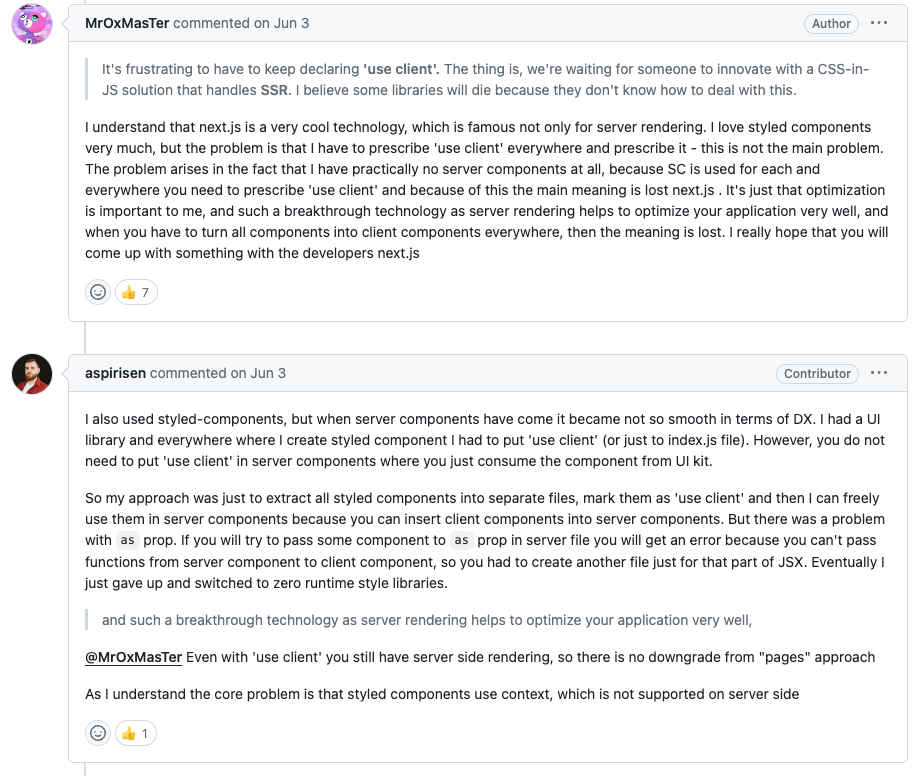 In fact, many developers are raising issues about this.
Of course, this doesn't mean
In fact, many developers are raising issues about this.
Of course, this doesn't mean styled-components is a wrong tool at all. In fact, many more developers and companies are using styled-components. However, I reached the conclusion that I needed to change styling tools to quickly implement desired behaviors in the upgraded NextJS.
Reason 2: Complex Setup
Using styled-components requires separate configuration:
-
When using app router Following the official website's recommendation, you need to create a global registry component and import that file.
-
When using page router You need to add style sheets on the server side to the
_document.tsxfile. Additionally, you need to apply babel configuration to ensure styling works smoothly on the server side. (Need to confirm if this is mandatory)
(In contrast, emotion can be used just by installing it!)
For these reasons, I decided to switch to emotion!
emotion vs styled-components
Since both tools are css-in-js libraries and use sass syntax, their usage methods are quite similar.
styled-components
const Title = styled.h1`
  font-size: 1.5em;
  text-align: center;
  color: palevioletred;
`
render(<Title>Hiya!</Title>)

// Object syntax
const button = styled.button({
  fontSize: '1.5em',
  textAlign: 'center',
  color: 'palevioletred'
});@emotion/styled: Package for component styling
const Button = styled.button`
  padding: 32px;
  background-color: hotpink;
  font-size: 24px;
  border-radius: 4px;
  color: black;
  font-weight: bold;
  &:hover {
    color: white;
  }
`

render(<Button>Hey! It works.</Button>)
---
render(
  <h1
    className={css`
      font-size: 1.5em;
      text-align: center;
      color: palevioletred;
    `}
  >
    Hiya!
  </h1>
)

// Object syntax
const titleStyles = css({
  fontSize: '1.5em',
  textAlign: 'center',
  color: 'palevioletred'
})

render(<h1 className={titleStyles}>Hiya!</h1>)
Although I haven't used both tools proficiently, I summarized some differences by browsing through official documentation and various blogs:
- emotion allows debugging using TypeScript when writing CSS (source)
- Component styling syntax in emotion was influenced by styled-components
- emotion is lighter
- emotion's syntax is more developer-friendly (source)
- Speed is comparable
Ultimately, which tool to use seems to depend on developer preferences and coding convention differences.
Switching to emotion
Now I just need to apply emotion to my personal blog!
Applying Global Styles
Use Global provided by @emotion/react to apply global styles to the entire project.
You can apply reset CSS here if needed.
// src/styles/GlobalStyle.tsx
import { Global, css } from '@emotion/react'

const style = css`
	...
	Global styles to apply to the project
`
const GlobalStyle = () => <Global styles={style} />

export default GlobalStyle
Then apply GlobalStyle to _app.tsx.
// src/pages/_app.tsx
import GlobalStyle from '@/styles/GlobalStyle'

export default function App() {
	return (
    	<>
      		<Head>...</Head>
      		<Layout>
      			<GlobalStyle /> // Apply here
      			...
      		</Layout>
      	</>
    )
}
After that, just erase traces of styled-components one by one.
Personal Project PR - Styling Tool Replacement
Looking at job postings, there are many companies using emotion (especially Toss..!), and it was a good opportunity while wanting to try new technology.
I was confused about what to study, but while creating a personal blog, let's continue studying react, nextjs, and even complete my resume and portfolio!
References