BLOG
KO
[React] Deep Dive into React (4) - Advanced Learning (2)
- Effect
- useEffect
- Cautions
- Reducer
- useReducer
- Step 1. Define a function that passes actions to the dispatch function
- Step 2. Define the reducer function
- Why is it called a reducer?
- Step 3. Use the reducer in your component
- Cautions
- Context
- Step 1. Create the context
- Step 2. Use the context
- Step 3. Provide the context
- Context Usage Examples
Effect
The basic role of React is to respond to user input and render UI.
All other logic can be called Effect. That is, Effect refers to all side effects caused by rendering itself.
- Http requests
- Storing data in storage
- Logging, etc...
To handle this, you can use useEffect().
useEffect
useEffect can be written as follows:
setup- Effect logic function
- Effect runs after every render
- Can return a
cleanupfunction if needed - The
cleanupfunction runs before every new Effect function executes, except for the first execution
dependencies- An array containing all reactive values referenced within the setup function
- React compares each dependency with its previous value using
Object.iscomparison - Everything used as an Effect must be added as a dependency. That is, only things that can change when the component re-renders should be added as dependencies.
Cautions
- If dependencies are objects or functions declared inside the component, the Effect may re-run more than necessary. In this case, you can remove unnecessary dependencies or "update state based on previous state".
- If the work performed by the Effect involves visual work and delay is noticeably occurring, you can use
useLayoutEffect. (Reference)
Reducer
As state increases, logic becomes more complex and difficult to manage. To integrate and manage this, you can use a reducer.
React uses the useReducer hook to use reducers.
useReducer
Step 1. Define a function that passes actions to the dispatch function
// AS_IS
function handleAddTask(text) {
  setTasks([
  ...tasks,
  {
    id: nextId++,
    text: text,
    done: false,
  },
  ]);
}

// TO_BE
function handleAddTask(text) {
  dispatch({
    type: 'added',
    id: nextId++,
    text: text,
  });
}
Instead of setting state to tell React "what to do", you pass an action to specify "what just happened".
Step 2. Define the reducer function
The reducer function takes the current state value and action object as arguments and returns the next state value.
function tasksReducer(tasks, action) {
  switch (action.type) {
    case 'added': {
      return [
        ...tasks,
        {
          id: action.id,
          text: action.text,
          done: false
        }
      ]
    }
    default: {
      throw Error('Unknown action type')
    }
  }
}
Why is it called a reducer?
Reducers get their name from the
reduce()operation you can perform on arrays. Just asreducetakes "so far" result and current item as arguments and returns the next "so far" result, a reducer function takes current state and action as arguments and returns the next state.
Step 3. Use the reducer in your component
import { useReducer } from 'react'

const [tasks, dispatch] = useReducer(tasksReducer, initialTasks)
Cautions
- Reducers must be pure. That is, if the input values are the same, the result value should always be the same.
- Each action should describe only one user interaction.
Context
In React, we use props to pass data between components.
However, when passing through many components or when multiple components need the same information, passing props becomes complicated.
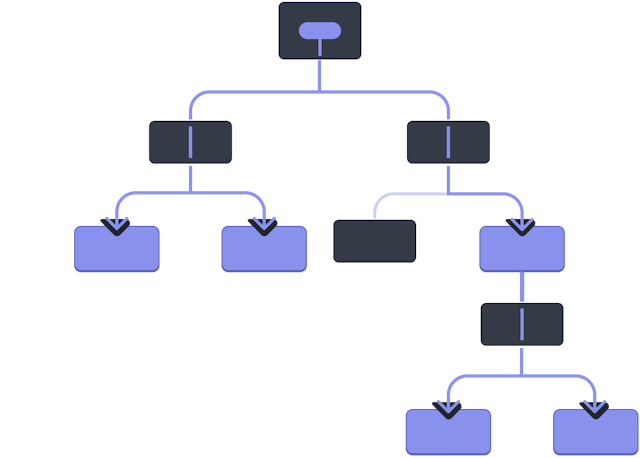
To solve this, you can use Context.
Step 1. Create the context
Use createContext to create a context.
import { createContext } from 'react';

export const LevelContext = createContext(1);
Step 2. Use the context
Use the useContext hook to use the created context.
import { useContext } from 'react';
import { LevelContext } from './LevelContext.js';

export default function Heading({ children }) {
  const level = useContext(LevelContext);
  // ...
}
Step 3. Provide the context
// AS_IS
export default function Section({ children }) {
  return (
    <section className="section">
      {children}
    </section>
  );
}

// TO_BE
import { LevelContext } from './LevelContext.js';

export default function Section({ level, children }) {
  return (
    <section className="section">
      <LevelContext.Provider value={level}>
        {children}
      </LevelContext.Provider>
    </section>
  );
}
Instead of passing props to all child components of the Section component, you can implement the same logic using context.

Context Usage Examples
- Theme specification
- Current account
- State management
With this, I've looked at and organized various concepts from React's basic concepts to advanced concepts. So far, I've been reading the official documentation and simply trying it out, but I plan to go further and directly examine React code to understand how it works. When that time comes, I'll be able to write even better quality posts!
What I learned through this post
Effectrefers to all side effects caused by rendering itself.Reduceris used to integrate and manage state.- Using
Contexteliminates the need to use props for passing data between components.
References